Document workflow · intermediate
Turn a sales spreadsheet into a monthly report
Check two months of figures, build a formula-backed summary, and write an editable one-page review.
You are aiming for: A summary workbook and a Word report that distinguish revenue growth from margin change.
1. Get the sample inputs
These fictional files are free to download and use for practice. Your files stay in the agent you choose; this website does not process them.
- Download monthly-sales.xlsx
Six synthetic sales rows across January and February 2026. Currency is USD; revenue excludes tax.
- Download monthly-sales.csv
The same six rows in a readable CSV, useful for checking the workbook.
- Download monthly-report-brief.txt
Audience, definitions, reporting period, and the boundary between observations and proposed actions.
2. Prepare the skills
Open each guide for the upstream source, setup requirements, and a smaller first exercise. Installation depends on your agent and its available tools.
Prepare XLSX and DOCX
Use the linked skill guides and upstream installation instructions. Confirm that your agent can produce both workbook and Word files.
Supply the source and brief
Download monthly-sales.xlsx and monthly-report-brief.txt, then attach both. The CSV contains identical input rows if your environment needs that format.
Verify the numbers
Use the spreadsheet skill to retain the raw rows and compute the requested measures. Check totals and definitions before writing the narrative.
Write the report
Use the document skill with the checked summary. Separate facts from hypotheses, and describe margin differences in percentage points.
Reconcile both artifacts
Open both files. Check that every figure in the report matches the workbook and inspect the report layout.
3. Run the first task
Attach the sample inputs in your agent, then send this prompt.
Use the XLSX and DOCX skills with monthly-sales.xlsx and monthly-report-brief.txt. Create sales-summary.xlsx with Raw data and Summary sheets. Preserve all six source rows and use formulas for monthly revenue, cost, gross profit, gross margin and month-over-month changes. Recalculate and check the numbers. Then create monthly-report.docx for the operations lead, with a two-month comparison table, three factual observations and one clearly labeled proposed follow-up. Use USD, distinguish percent changes from percentage-point changes, and invent no causes or forecasts. Inspect the report layout and return both files with the checks actually performed.
4. Check the files you get back
Use these specifications to check your own result. Any recorded example outputs are listed separately below.
- sales-summary.xlsx
- Raw data and Summary sheets with monthly revenue, cost, gross profit, gross margin, and month-over-month changes.
- monthly-report.docx
- An editable one-page brief with a comparison table, three factual observations, and a clearly labeled proposed follow-up.
Acceptance checklist
- January revenue is USD 12,000, cost is USD 6,000, gross profit is USD 6,000, and gross margin is 50%.
- February revenue is USD 15,000, cost is USD 7,800, gross profit is USD 7,200, and gross margin is 48%.
- Revenue grows 25% and gross profit grows 20%; gross margin falls by 2 percentage points.
- All six original rows remain intact, and summary calculations use formulas with recalculated values.
- The DOCX figures match the workbook, its table is editable, and the rendered report has no clipping.
- No unsupported explanation for the changes, customer claim, forecast, or recommendation presented as an observed fact appears.
Limits of this exercise
- The data is synthetic and small. It does not test refunds, tax, missing dates, mixed currencies, or accounting reconciliation.
- Gross profit here means revenue minus the supplied cost; it is not net income.
- The recipe checks reporting consistency, not financial forecasting or business performance.
Recorded example run
These files came from actual execution in a Codex session. They were produced and checked within the same session; this is scoped evidence, not independent review or a measured success rate.
Sales workbook summarized in an editable monthly report
Executed · Automated Codex exercise
Codex agent in this session; Python 3.12.3, openpyxl 3.1.5, LibreOffice 24.2.7.2 420(Build:2); aarch64. Report generation: docx 9.8.1, Node v24.13.0.
The agent read the pinned upstream instructions and applicable helpers, then authored and executed the committed scripts locally. This is not a native Claude skill-loader test or an independent benchmark.
Download the actual outputs
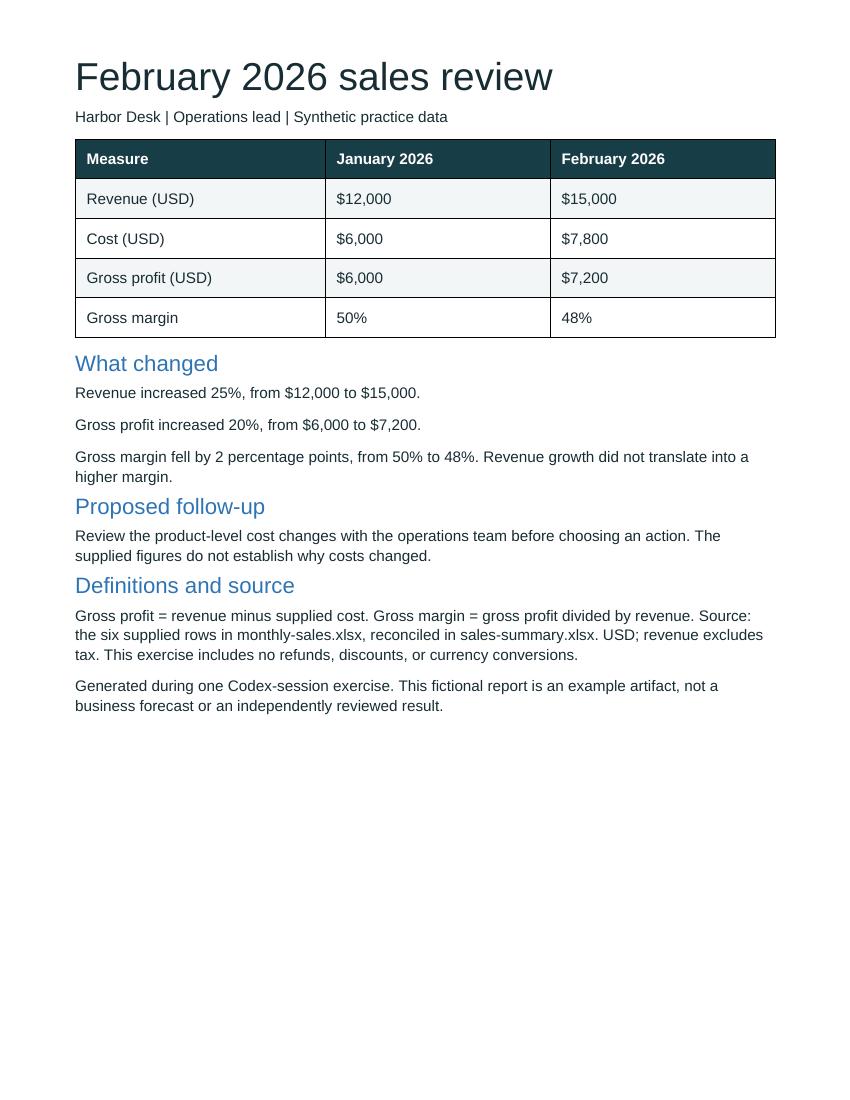
Recorded checks and observations
- Passed: All six input rows are preserved and the summary retains formulas.
- Passed: Recalculated January/February revenue is USD 12,000 / 15,000; gross margin is 50% / 48%.
- Passed: The DOCX contains an editable five-row table and the expected figures; all XML parts parse.
- Passed: The report renders to one page with expected text. The creating agent inspected the image and observed no clipping or overlap.
Scope, limitations and pinned sources
- The agent read the pinned upstream instructions and used their prescribed tools. Native Claude skill loading and general cross-agent compatibility were not tested.
- One small synthetic input per workflow; results are not a success rate or a broad model-compatibility claim.
- The Codex agent that produced the outputs also ran and interpreted the checks; no independent human review occurred.
- Spreadsheet recalculation used LibreOffice 24.2.7.2; Microsoft Excel was not run.
- DOCX structure and one-page LibreOffice rendering were checked; Microsoft Word and Google Docs rendering were not tested.
- The temporary LibreOffice render emitted Java-launch and liblangtag registry warnings. Conversion returned 0 and the produced PDF was inspected; unsupported language/layout cases remain untested.
- This session already knew the published acceptance criteria. The CSV answer key was read by verification after PDF extraction, but this is not a blind or held-out evaluation.
Try it, then tell us how it went
A copied prompt does not tell us whether the task worked. Report your result after checking the output. We collect your tool and outcome, never your files or prompt.
Open your saved librarySources behind this recipe
The upstream skill instructions informed tool choices. The scenario, sample data, prompt, and expected results are original OpxSkills material. Source review date: 2026-10-04.
Try another document workflow
PDF + XLSX
Turn a PDF table into a usable Excel sheet
Extract six invoice lines, keep their source references, and reconcile the result before using it.
An editable workbook with all six items and a checked USD 1,250.00 subtotal.
Sample inputs included · Recorded example output
Try this workflowPPTX
Turn meeting notes into decision slides
Build a five-slide launch review that preserves decisions, owners, deadlines, and unresolved questions.
An editable PowerPoint deck with five slides and source references in its speaker notes.
Sample inputs included · Recorded example output
Try this workflow